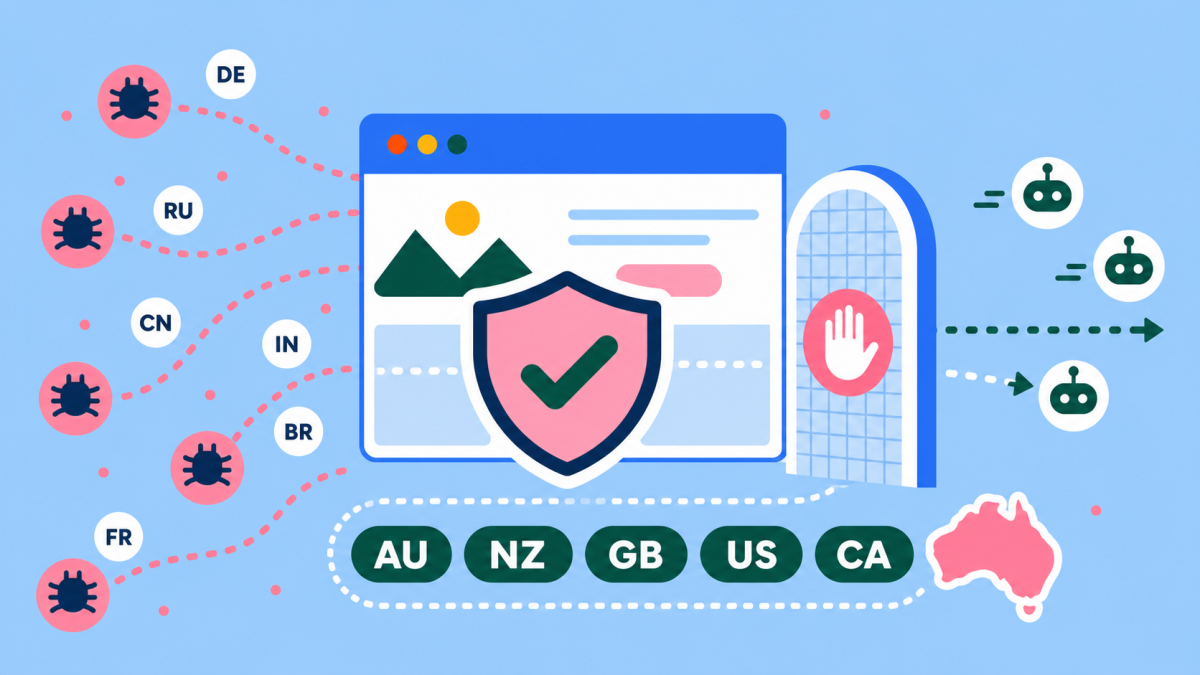
Stop Bot Traffic Overloading Your Website
Bot traffic has become a real problem for many business websites.
We are seeing more sites dealing with heavy crawler activity, strange traffic spikes, higher server load and, in some cases, full crashes. Some of this traffic comes from AI crawlers. Some comes from scrapers. Some comes from automated tools that do not bring any clear value to the business.
For a small or medium business, that is frustrating. Your website should be serving customers, not spending most of its resources answering low-value automated requests from overseas.
There is no single fix that suits every website. But for many Australian businesses that mainly serve local customers, a simple Cloudflare Managed Challenge rule can reduce the load.
The key is to challenge the right traffic without blocking useful crawlers such as verified search engine bots.
Quick Answer
If your website mainly serves Australian customers, you can often reduce unwanted overseas bot traffic by using a Cloudflare Managed Challenge rule for visitors outside your main markets, while excluding verified bots with not cf.client.bot.
This is not right for every site. It needs to be tested before it is rolled out broadly.
Why Bot Traffic Is Getting Worse
Most websites have always had some bot traffic.
Search engines crawl websites. SEO tools scan pages. Uptime tools check whether a site is working. Security tools look for risks. Some of that traffic is useful.
The problem is the volume of low-value automated traffic has grown. AI crawlers, content scrapers, spam tools and unknown bots can hit a site many times a day. On some sites, they request pages faster than real users ever would.
That can cause problems such as:
- slower page load times
- higher hosting resource use
- overloaded WordPress sites
- more cache misses
- more security noise
- more form spam
- server timeouts
- full site crashes during traffic spikes
This is worse on sites with poor hosting, weak caching or heavy WordPress setups. A bot that requests one page is not a big issue. A group of bots hitting hundreds or thousands of URLs can be a very different story.
Here is an example from a busy WooCommerce site. Cloudflare mitigated a large spike in requests within a short window, while normal origin traffic continued underneath. Without Cloudflare taking that load, this spike would likely have crashed the server.
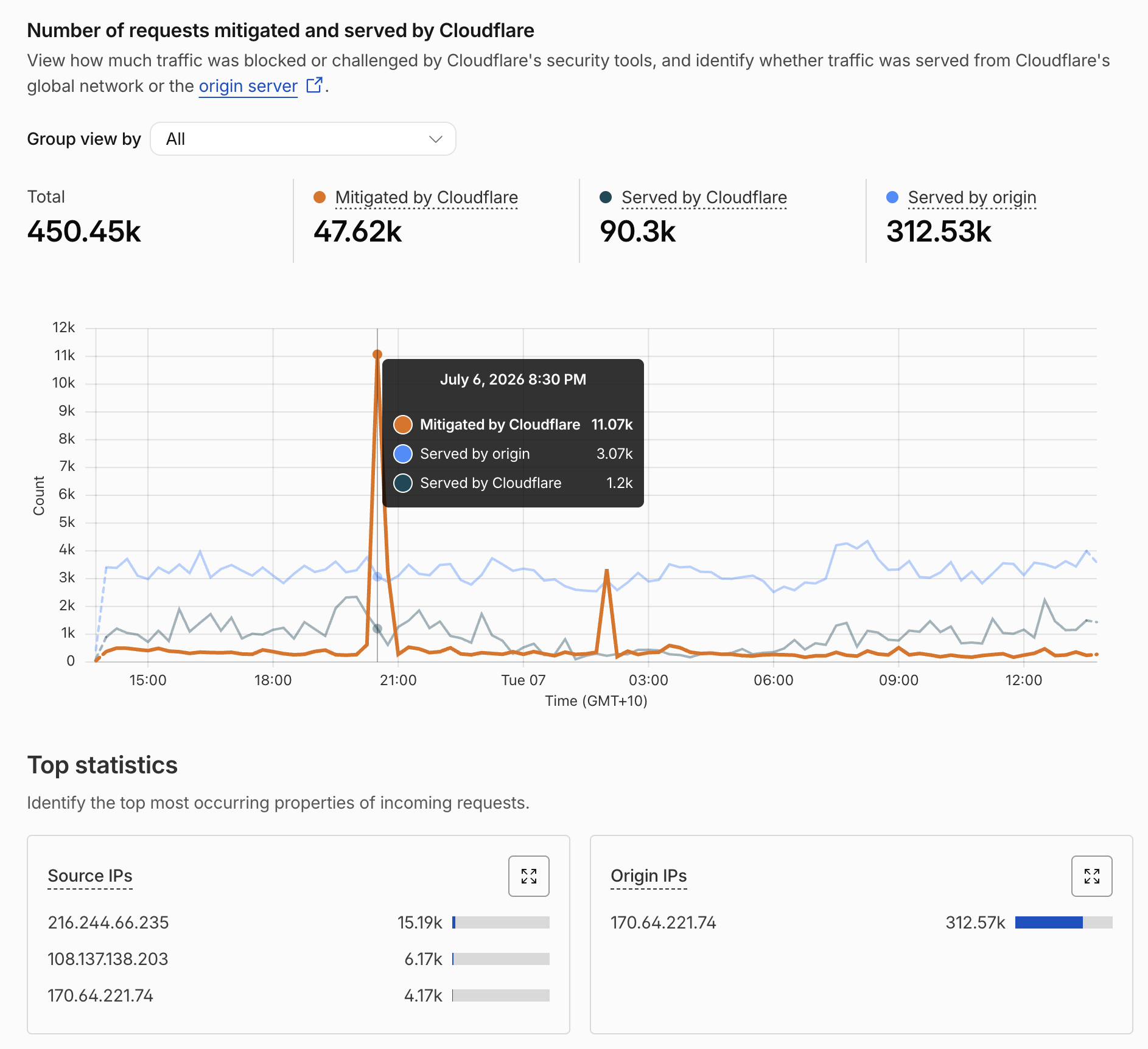
A real Cloudflare traffic spike from a busy WooCommerce site. Without mitigation, this kind of spike can crash the origin server.
What Is A Managed Challenge?
A Managed Challenge is a Cloudflare action that asks Cloudflare to check whether a visitor looks legitimate.
It is softer than a block. Instead of banning the visitor outright, Cloudflare can run checks in the background or show a challenge if needed.
That matters because not all overseas traffic is bad. A real customer might be travelling. A supplier might be overseas. A staff member might be working remotely. A useful platform might be checking your site.
A hard block can stop legitimate users. A Managed Challenge gives you more control without being quite so blunt.
How Cloudflare Normally Stops Bots
Cloudflare can stop or reduce bot traffic in a few different ways.
The right mix depends on the site, the traffic pattern and how much risk the business can accept. A small local business website does not need the same setup as a large eCommerce store or app.
Common Cloudflare controls include:
- Bot Fight Mode: a simple setting that helps challenge or slow down obvious automated traffic.
- Managed Challenge: a flexible action that lets Cloudflare check suspicious visitors without blocking everyone outright.
- WAF rules: custom firewall rules that target traffic by country, path, user agent, request rate or other signals.
- Rate limiting: rules that slow down visitors or bots making too many requests too quickly.
- Super Bot Fight Mode or Bot Management: stronger paid options for identifying and controlling automated traffic.
- Verified bot handling: a way to treat known good bots differently from unknown or suspicious bots.
- Caching: not a bot control by itself, but it can reduce the server load caused by repeat requests.
For many WordPress sites, the best first step is not a complicated setup. It is usually a simple rule that reduces the worst traffic, while keeping the site open for real users and useful crawlers.
The country-based Managed Challenge rule below is one example of that.
The Simple Cloudflare Rule
For an Australian business that only works with Australian customers, this rule can be a useful starting point:
(not ip.geoip.country in {"AU"}) and (not cf.client.bot)
Action:
Managed Challenge
In plain English, this says:
Challenge visitors who are not from Australia, unless Cloudflare recognises them as a verified bot.
The second part is important:
not cf.client.bot
That helps avoid challenging verified bots such as major search engine crawlers. You generally do not want to make life harder for Googlebot and other legitimate crawlers that support search visibility.
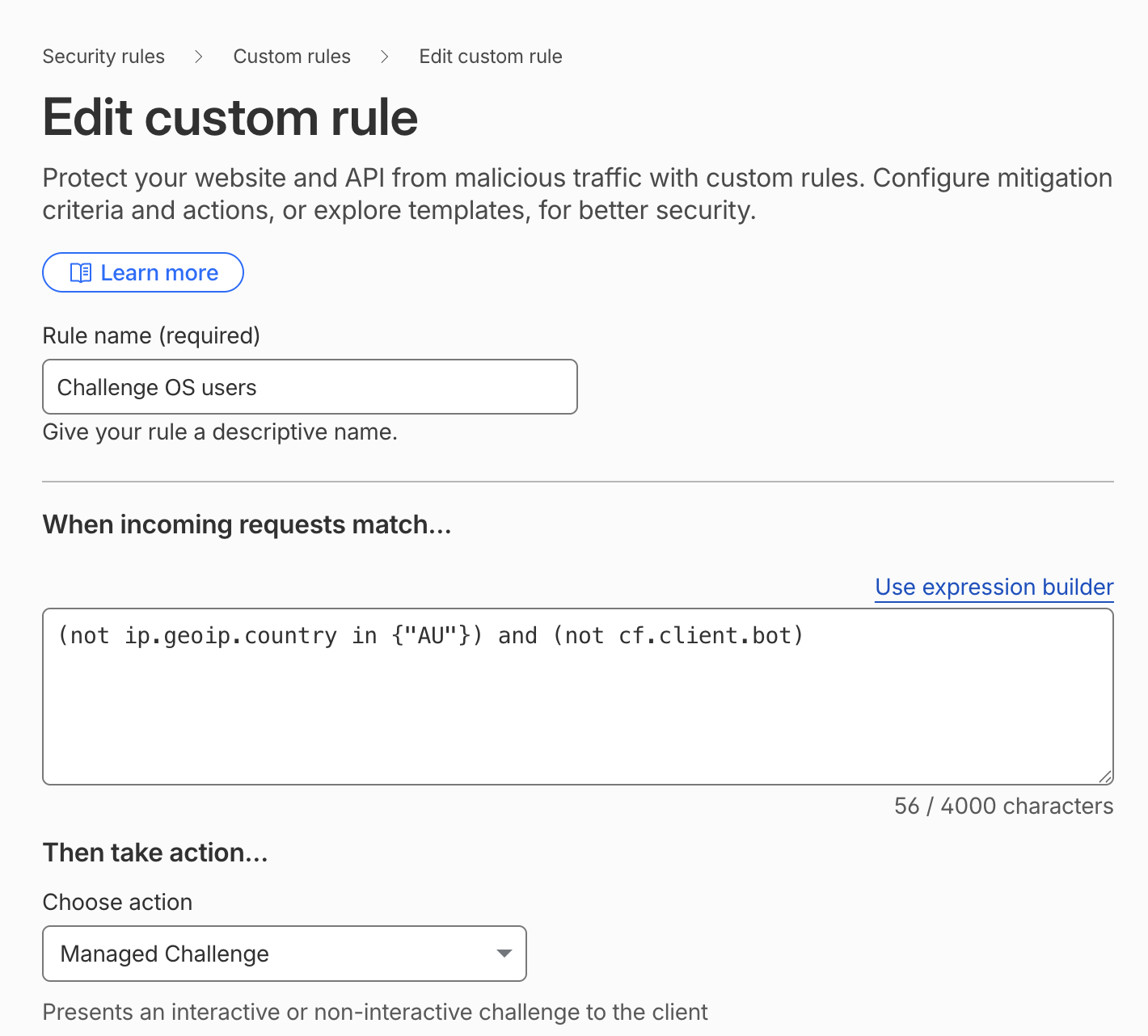
Example Cloudflare custom rule using Managed Challenge for non-Australian traffic while excluding verified bots.
Wider Rules For Common Markets
Not every Australian business only serves Australia.
Some businesses also work with New Zealand or the United Kingdom. Others get real leads from the United States or Canada. In those cases, the rule should be adjusted.
For businesses that commonly serve Australia, New Zealand and the United Kingdom:
(ip.geoip.country ne "AU" and ip.geoip.country ne "NZ" and ip.geoip.country ne "GB") and (not cf.client.bot)
For businesses that also want to allow the United States and Canada:
(ip.geoip.country ne "AU" and ip.geoip.country ne "NZ" and ip.geoip.country ne "GB" and ip.geoip.country ne "US" and ip.geoip.country ne "CA") and (not cf.client.bot)
These are simple examples, not universal settings.
Before using them, look at where your real customers, staff, suppliers and tools are located.
When This Rule Makes Sense
This kind of rule can work well for local service businesses.
Examples include:
- trades and construction businesses
- local clinics
- professional service firms
- local tourism operators
- Gold Coast and Brisbane service businesses
- Australian-only lead generation sites
- businesses that rarely deal with overseas customers
For these sites, most high-value traffic often comes from Australia. Challenging unknown overseas traffic can reduce server strain without hurting the main customer journey.
It can also be useful when a site is already under pressure and needs a quick layer of protection while deeper fixes are being made.
When You Should Be Careful
This rule is not suitable for every website.
Be careful if your business:
- sells internationally
- runs international ads
- has offshore staff or contractors
- serves customers in many countries
- runs a SaaS product
- relies on global partners or suppliers
- has a booking system used by travellers
- receives important traffic from overseas search markets
In those cases, a broad country-based challenge may create friction for real users.
You may still use Cloudflare rules, but the setup should be more specific. For example, you might challenge traffic only on certain URL patterns, only at higher threat scores, or only when requests match suspicious behaviour.
Do Not Block Good Bots By Accident
This is the part that can cause damage if it is missed.
You do not want a security rule to block or challenge useful bots unnecessarily.
Search engines need to crawl your site. If Google cannot crawl important pages, SEO can suffer. Other verified services may also need access, depending on the tools you use.
That is why the rule includes:
not cf.client.bot
This tells Cloudflare to exclude verified bots from the challenge.
It is not a perfect solution for every crawler question, but it is a sensible safeguard. It helps reduce the risk of a security rule interfering with search visibility.
What About AI Crawlers?
AI crawlers are part of the wider bot traffic problem.
Some AI crawlers may help your content appear in AI search tools. Others may scrape content without sending useful traffic back. Some are clear about who they are. Others are harder to identify.
For most business websites, the best answer is not to block every AI crawler without thinking. It is better to look at the traffic, decide what is useful, and protect the server from crawler activity that creates load without business value.
This is where Cloudflare, hosting logs and Search Console can help.
Look at:
- which bots are visiting
- how often they crawl
- which pages they hit
- whether they respect rules
- whether they cause performance issues
- whether they send any meaningful traffic
Then make a decision based on evidence.
Bot Traffic Can Mess Up Your Analytics
Bot traffic does not only affect server performance. It can also make your analytics harder to trust.
If a site is getting a lot of automated visits, the data can start to look strange. You may see traffic increases that do not lead to enquiries. You may see odd countries in your reports. You may see pages with high views but no real engagement.
That can lead to bad decisions.
For example, a business might think a blog post is performing well because page views are up. But if much of that traffic is from crawlers, the page may not be bringing in real buyers.
Bot traffic can affect:
- page views
- session counts
- bounce rate
- engagement rate
- conversion rate
- country and city reports
- referral reports
- campaign performance
- server-side logs
- form spam reports
This is one reason bot control is not only a security issue. It is also a marketing issue.
Clean analytics help you understand what real customers are doing. Messy analytics make it harder to know which SEO work, ads, content and campaigns are actually working.
Cloudflare rules can help reduce some of the junk before it reaches the website. Analytics filters and bot exclusions can also help, but it is usually better to reduce the bad traffic at the edge where possible.
What To Check Before Turning This On
Before adding a country-based Managed Challenge, check a few things.
1. Where Your Customers Are
Do not assume all useful traffic is local.
Look at analytics, enquiries, sales and ad campaigns. If real customers come from outside Australia, include those countries or use a more targeted rule.
2. Whether Your Forms Still Work
After adding a challenge, test your contact forms, quote forms, booking forms and checkout if you have one.
Do this from the main countries you care about where possible.
3. Whether SEO Crawlers Are Excluded
Keep not cf.client.bot in the rule unless there is a very specific reason not to.
You can also keep an eye on Google Search Console after changes. If crawl errors increase, review the rule.
4. Whether Important Tools Are Affected
Some tools may use overseas servers.
That can include uptime monitoring, marketing automation, CRMs, booking tools, payment tools, email tools and SEO platforms.
If something breaks after the rule is added, check whether that service needs an allow rule.
5. Whether Hosting Still Needs Work
Cloudflare can reduce pressure, but it does not fix weak hosting or a poorly maintained WordPress site.
If your site crashes easily, you should still review hosting, caching, plugin load, database performance and security settings.
WordPress Sites Need Extra Care
WordPress is flexible, but it can be heavy when it is not maintained.
Bot traffic can expose problems that were already there:
- too many plugins
- no page caching
- slow database queries
- old themes
- abandoned plugins
- large images
- weak hosting
- no firewall rules
If a few crawler spikes can crash the site, the Cloudflare rule is a good first step. It should not be the only step.
A proper fix may include better caching, plugin cleanup, server-level changes, image optimisation, database cleanup and a stronger website care plan.
That is where Thrive often helps: WordPress development, hosting, website care plans, performance work, SEO and website security all overlap here.
How This Fits With SEO
Security and SEO should not fight each other.
A good setup protects the website while still allowing useful discovery. That means:
- Googlebot can crawl important pages
- real users can enquire without friction
- junk traffic is challenged or limited
- server resources are protected
- the website stays fast
This is also useful for AI search. If your site is slow, unstable or hard to crawl, it is less likely to perform well in any search environment.
Good technical SEO starts with a site that can stay online under pressure.
A Practical Setup For Many Australian Sites
For many local Australian businesses, we would start with something like this:
- Review analytics and server logs.
- Check which countries send real leads.
- Add a Cloudflare Managed Challenge for countries outside the main markets.
- Exclude verified bots with not cf.client.bot.
- Test forms, checkout, booking tools and key pages.
- Watch Cloudflare events and Search Console.
- Tighten or loosen the rule based on real data.
This is simple, but it is not careless.
The goal is to reduce waste without blocking value.
FAQ
Will this block overseas visitors?
No. A Managed Challenge is not the same as a block. It asks Cloudflare to check the visitor. Some users may see a challenge, while others may pass in the background.
Should every Australian business use this rule?
No. It suits some local businesses, but not all sites. Businesses with international customers, staff or campaigns need a more careful setup.
Why include not cf.client.bot?
It helps exclude verified bots from the challenge. This reduces the risk of challenging useful crawlers such as major search engine bots.
Can this stop AI crawlers?
It can reduce some unwanted crawler traffic, including traffic from some overseas bots. It is not a complete AI crawler policy. For that, you should also review robots.txt, server logs and crawler behaviour.
Will this fix a slow WordPress site?
It may reduce load, but it will not fix deeper WordPress performance problems. If the site is slow or unstable, review hosting, caching, plugins, database performance and security.
Is a Managed Challenge better than a block?
Often, yes. A challenge is less blunt than a block. It gives Cloudflare a chance to verify visitors instead of denying them straight away.
Conclusion
Bot traffic is no longer just a background issue. For many business websites, it is now a performance and reliability problem.
If your site mainly serves Australian customers, a Cloudflare Managed Challenge rule can be a simple way to reduce unwanted overseas traffic. The rule should exclude verified bots, and it should be tested before you rely on it.
This is not a replacement for good hosting, clean WordPress development, SEO, website security or ongoing care. It is one useful layer.
If crawler traffic is slowing your site down or crashing your server, start with the evidence. Check where the traffic is coming from, protect the site carefully, and keep the door open for the visitors and crawlers that actually matter.